Why Do You Get Targeted Ads After Talking About Something In Real Life?
It feels like your phone heard you—what would have to be true for that to happen?
You mention “air fryer” at dinner, and by bedtime you’re seeing air fryer ads. The jump your brain makes is simple: the phone must have heard you. For that to be true, an app would need microphone access, keep listening long enough to catch useful phrases, turn that audio into text, and send it out without you noticing a big battery or data hit.
That’s possible in narrow cases, but it’s also risky and expensive for companies, and it would leave traces you can often check.
More often, ads “match” because your phone already has enough clues to guess. The fastest way to calm this down is a quick reality check you can do right now.
Before blaming the microphone: a fast reality check you can do right now
When an ad feels too perfect, most people reach for the same test: “Did something just use my mic?” A quick check takes under two minutes and tells you whether that’s even on the table.
Open your phone’s Privacy settings and look at Microphone access (on iPhone: Settings >'' Privacy &'' Security >'' Microphone; on Android it’s usually Settings >'' Privacy >'' Permission manager). If the app you suspect doesn’t have mic permission, it didn’t record your conversation. If it does, check your microphone activity indicator or recent permission usage (many phones show which apps used the mic in the last 24 hours). No recent use is a strong clue you’re chasing the wrong cause.
This isn’t perfect—some apps can request access for legitimate features, and the logs aren’t always detailed—but it narrows the field fast. If the mic doesn’t explain it, the next place to look is the trail you already left.
The most common reason: you already left a trail (searches, views, clicks, app activity)

If the mic doesn’t explain it, the usual culprit is boring: you touched something related earlier, and the ad systems connected the dots. It might be a quick Google search, watching two TikToks about “easy weeknight dinners,” clicking a product link in a group chat, or even lingering on a shopping page without buying. Those tiny actions get logged as signals, and ads update fast.
It also stacks. If you looked up “how to clean an oven” last night, then today you scroll past a cookware video and like it, an air fryer ad can feel like it came from dinner talk when it really came from your trail. Even app activity that isn’t “shopping” can do it—maps searches, YouTube history, and browser tabs count.
The annoying part is testing this: you can’t easily see every signal used, and clearing one history (like your browser) doesn’t reset what an app already learned. That’s where “nearby” clues start filling in the gaps.
Location and ‘nearby’ clues: when your phone doesn’t need words to guess your interests
“Nearby” clues kick in when you do something normal, like stop at a big-box store, sit in a dentist waiting room, or spend an hour at a friend’s place. Even if you never say a word, your phone can pick up patterns: you were at a location where lots of people browse certain products, you searched for directions to a store, or you spent time in a cluster of places that usually go together (gym, smoothie shop, sporting-goods store).
It’s not just GPS. Apps can infer rough location from Wi‑Fi networks, Bluetooth beacons, and cell towers, and they can treat “visited this place” as a strong hint. If you walk into a baby store once, you might see diaper ads for days, because one clear signal can outweigh a week of mixed browsing.
The hard part is you can’t always tell which app collected it, because the location permission you granted “for maps” can also feed ad targeting. And once location is in the mix, the next weird thing is how other people’s behavior can bleed into yours.
Why your partner’s searches can become your ads (shared Wi‑Fi, households, and “people like you”)
That “bleed” often shows up at home: you didn’t search for running shoes, but your partner did, and now you’re seeing the ads. A common reason is that ad systems group devices that look like they belong together—same Wi‑Fi network most nights, the same general location patterns, and regular proximity (your phones are near each other a lot).
Once you’re in a “household” or “likely together” bucket, one person’s signals can influence what the other person gets shown, especially on shared platforms like YouTube, Instagram, Amazon, or streaming apps on a TV. It can also happen through shared accounts, shared computers, or the same browser being used on a tablet. None of that requires listening; it’s more like saying, “these devices behave like a unit.”
The frustrating limitation is you can’t see the exact links being made, and turning off one setting won’t always break the grouping. That’s why a simple, controlled test over a few days can be more convincing than guessing.
Is it coincidence, or did something actually “follow” you? A simple 3‑day experiment
A controlled test works because normal life is noisy: you talk, scroll, click, and move around, and it all blends together. For three days, pick one “weird” topic you haven’t searched for lately—like “air fryer,” “laser hair removal,” or “standing desk”—and make it the only thing you change.
Day 1: talk about it out loud a few times near your phone, but don’t type it, don’t watch videos about it, and don’t ask maps for directions to a related store. Day 2: keep talking, but also avoid “nearby” triggers—don’t visit the store section, don’t browse a product aisle app, and don’t open links friends send you. Day 3: do the opposite: stop talking about it, but search it once and click a couple results.
If ads show up after Day 3, that points to your trail, not your mic. If they show up after Day 1 with no other changes, that’s worth checking permissions again—but be honest: most tests get “messy” because a single accidental click ruins the clean setup. The next step is changing a few controls that actually move the needle.
Controls that make a noticeable difference (and what won’t)
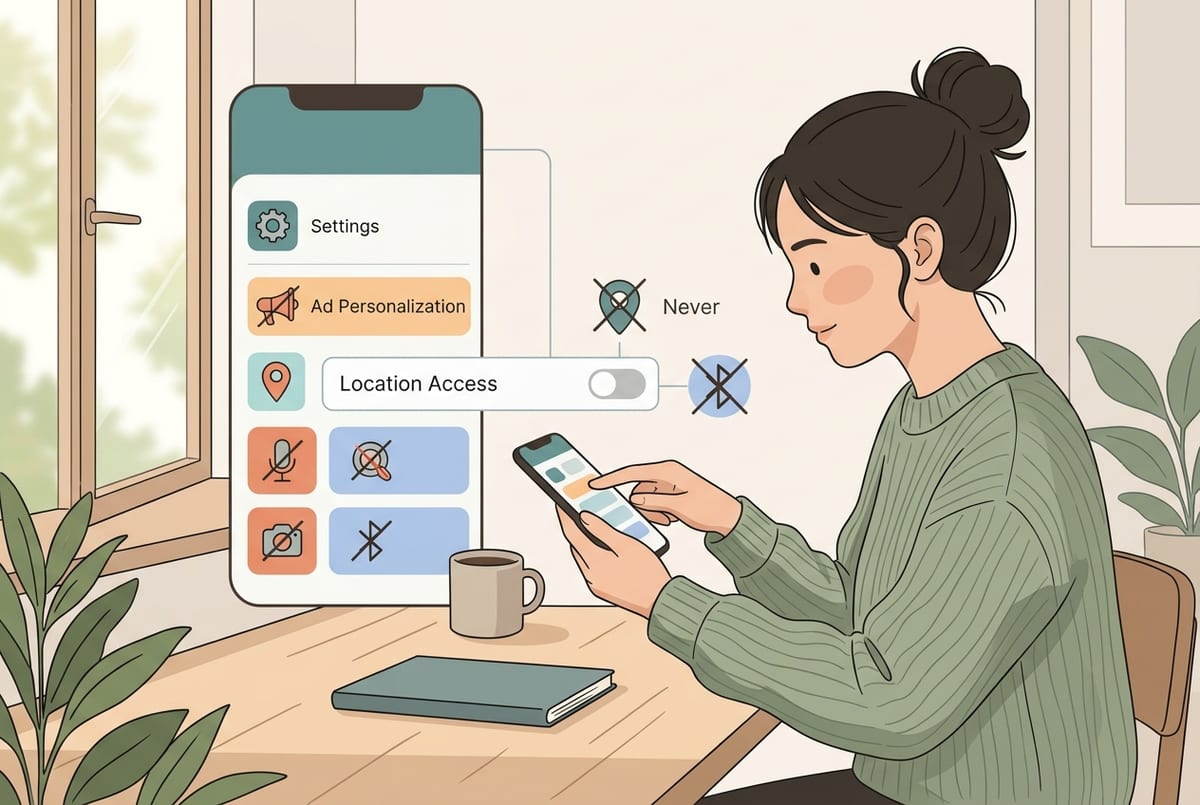
If your 3-day test pointed to clicks and “nearby” signals, start by cutting the feed lines that update fastest. Turn off ad personalization where you can (Google/Android ad settings, Apple’s ad settings), and inside the apps that keep surprising you (Meta, TikTok, Amazon). Then tighten permissions: set Location to “While Using” (or “Never” for apps that don’t need it), remove Bluetooth access for apps that aren’t clearly using it, and review camera/mic permissions anyway. Finally, break easy linkages: use separate accounts on shared services, and don’t stay logged into the same Google/Meta account across every device.
What usually won’t change much: clearing cookies once, flipping a single “Do Not Track” toggle, or deleting one app while leaving the same accounts and habits in place. Also expect some inconvenience—maps features get worse, local recommendations get dumber, and you may have to log in more often. If you want a clean reset, the next step is changing what you tell yourself when the timing still feels too perfect.
What to tell yourself next time it happens—and the few steps that keep it from feeling creepy
When the timing still feels too perfect, treat it like a three-part checklist: “Did I touch it, did I go near it, or did someone close to me touch it?” If you searched, watched, clicked, used maps, or even hovered on a product page, that’s usually enough. If you were at a place tied to the topic, location and Wi‑Fi clues can do the rest. And if you share a home network or accounts, someone else’s trail can spill over.
Then do three quick moves: deny mic access for any app that doesn’t truly need it, set Location to “While Using” for the apps that surprised you, and turn off ad personalization on the platform where you saw the ad. You’ll lose some convenience, but you’ll also stop feeling ambushed.